> For the complete documentation index, see [llms.txt](https://learnpython.strivemath.com/p5-python-web/llms.txt). Markdown versions of documentation pages are available by appending `.md` to page URLs; this page is available as [Markdown](https://learnpython.strivemath.com/p5-python-web/reference/shapes/2d/triangle.md).
# triangle()
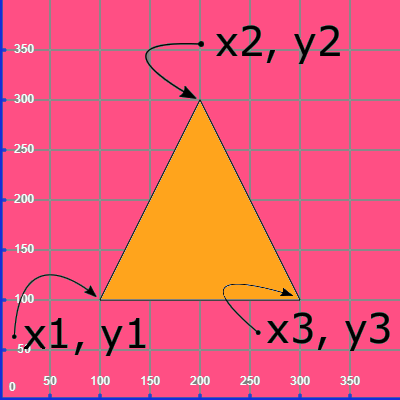
Triangle - Draws a triangle with the given inputs
### Example

```python
triangle(100, 100, 200, 300,300,100)
```
### Syntax
```python
triangle(x1, y1, x2, y2, x3, y3)
```
Input
Description
x1
x co-ordinate of the left corner
y1
y co-ordinate of the left corner
x2
x co-ordinate of the middle corner
y2
y co-ordinate of the middle corner
x3
x co-ordinate of the right corner
y3
y co-ordinate of the right corner
### Description
**triangle()** draws a triangle on the canvas, using the inputs to determine the positions of the 3 corners. Even though this is the simplest 2D shape, it takes the most complicated form of input, since total freedom to specify the shape is given.
{% hint style="info" %}
Find these documents helpful? Let the people who made them help your child learn to code at [**Strivemath**](https://www.strivemath.com/)**!**
We'd love to hear your Feedback/Comments [here](https://docs.google.com/forms/d/e/1FAIpQLSeqorBAGTya-YBRI-VFjJxtgQtCz3ucGDI96K96sNyuaGuvdw/viewform?usp=sf_link).
{% endhint %}